My Boring AI Stack for Product Design
It’s easy to get seduced by the latest shiny AI tool. Every week there’s something new promising to revolutionize your workflow, and every week my LinkedIn feed fills up with people breathlessly sharing their latest discovery.
I’m probably too old (and definitely too lazy) to chase everything that appears out there. Instead, I’ve settled into a boring stack: tools that aren’t new, but that I trust and actually use every day.
The Core Stack for Product Design Work
ChatGPT + Vercel’s v0
These are still my main tools for processing PRDs and exploring interface directions. Nothing fancy here. What makes ChatGPT useful isn’t the tool itself , it’s the context I’ve built around it.
I maintain a personal library of ~500 notes on design, product, and business, loosely based on Tiago Forte’s PARA method. These aren’t just bookmarks or highlights. They’re learnings, patterns I’ve noticed, and design principles I actually believe in. When I’m working through a design problem, that library gives ChatGPT the context to respond in ways that feel aligned with how I think.
I wrote more about this approach in How I Built My Design Buddy, but the short version is: generic AI gives you generic answers. Contextualized AI gives you something worth using. My advice: go start building yourself your own context!
Granola AI
I’ve never been good at live note-taking. I either listen or I write, never both. And when I’m trying to do both, I’m doing neither well.
Granola reliably captures meeting summaries, decisions, and action items without me having to split my attention. The real value isn’t in the transcript , it’s in being able to ask “what did we decide about that edge case?” a week later and actually get an answer. That removes a huge amount of cognitive load.
Granola → Obsidian Plugin
Granola’s native search is limited. You can find things, but it’s not built for connecting ideas across meetings or projects for a long time period.
So I sync summaries and transcripts into Obsidian as markdown files using a community plugin. Now those meeting notes live in the same system as my design notes. Hello, new context.👋
What I’m Exploring Now: AI Agent Skills (.md)
This is the part I’m genuinely excited about.
AI agent skills are small, reusable manuals for AI tasks. Think of them as instruction sets you can attach to tools like Claude, v0, or Figma Make. Instead of re-explaining your standards every time, you package them once and the AI references them whenever it’s relevant.
I’m building these out of the stuff I’ve already learned and documented:
Example 1: Copy Skills I read Kinneret Yifrah’s Microcopy: The Complete Guide a while back and took extensive notes. I distilled those notes into 50 rules — must do this, should consider that, never write like this — and packaged them as copy-skills.md. Every interface prompt will now include these rules and the copy will simply be better.
Example 2: UI Skills Vitaly Friedman posts these brilliant UI breakdowns on LinkedIn. I’ve been collecting them for months. I translated the best patterns and anti-patterns into “The 100 UI Commandments” and saved it as ui-skills.md. Attach it to v0 when exploring interfaces, and suddenly the output feels much more intentional.
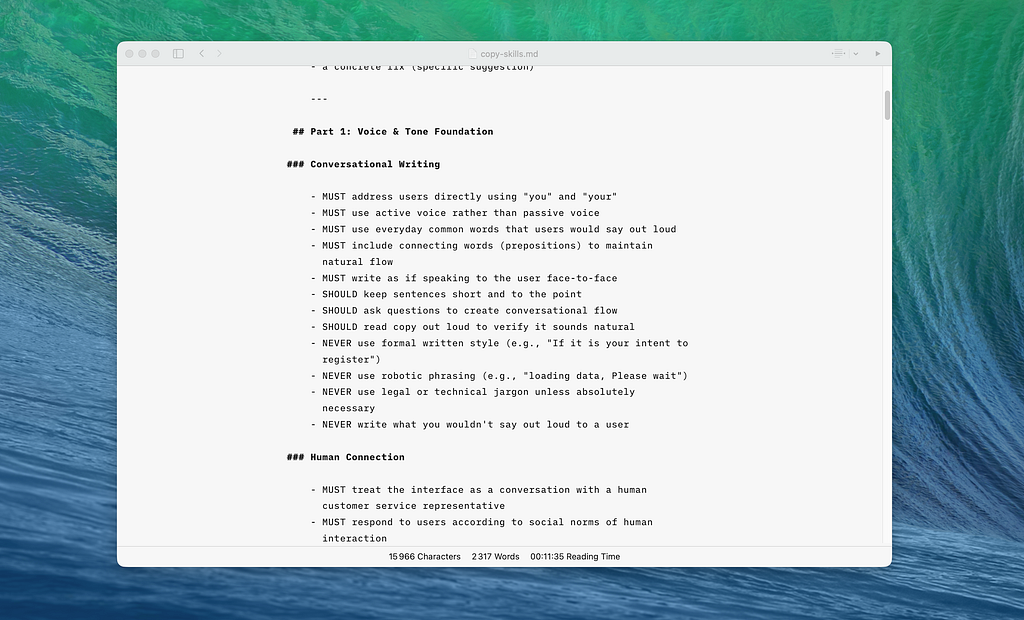
The difference is tangible. Without skills, AI gives you good, but somewhat generic work. With skills, it gives you work that aligns with what you think is good — because you’ve explicitly told it what good looks like.
My advice
Start building your context library now. Capture what you think is good design, good writing, good decisions, good practices, values that you align with. Without that context, AI gives you the average of its training data. With it, you get something that feels like yours. It’s a new way to make AI outputs feel less like “the algorithm decided” and more like “this is how I’d do it.”
Find tools that you actually like and trust. My boring stack works (for me) because it’s reliable, not flashy. It’s ok to not pursue the newest thing.